Showing posts with label Wimax. Show all posts

Free Mac address for Globe and Smart. June 28,2014

 With the help of different forums out there, I am going to give you free MAC address in a daily basis. Premium might be included but very rare.

June28, 2014

mac address for bm622m users.

34CDBEDD5F2C (AssDO-lTtHS8XnBY)
34CDBEDD5AE0 (oaLnKAvcJL5A2pvF)
34CDBED548F1 (2Ac3QRbzlFcXHH0Q)
34CDBEDDA5E4 (hcDjk1jdFva981i6)
34CDBECF8610 (u_VjbolLSH6t-ITR)

For bm622, bm622i, 625 and other users:

10C61FAB5C9E
404D8ED0665C
5C4CA9C07E04
0025689C7E96
10C61FAB6062

Working POKPOK VIP Mac Address 2014

Working POKPOK VIP Mac Address 2014


Uncapped Globe Wimax Accounts that could reach a bandwidth of up to 12Mbps. Use this as a reference guide for your hunting/sniffing/paanak.


  1.  To Change Mac Address use this tool : Wimac Tool Mac Changer


@globetel.com.ph
00:21:07:00:28:83
00:17:C4:28:40:29
00:25:68:2C:41:0C
00:1E:10:8D:F6:A5
00:1E:10:32:C4:90
00:1E:10:32:C2:DA
00:1E:10:32:C2:A2
00:1E:10:32:C3:B6
00:1E:10:32:C3:b2
00:1E:10:8D:F6:4D
00:1E:10:32:C4:86
00:1E:10:31:C4:5E
00:1E:10:32:C4;96
00:1E:10:32:C3:Fc
00:1E:10:32:C3:F0

@innove.com.ph
00:17:C4:2C:33:09
00:04:D5:0E:13:B8
20:7C:8F:43:45:01

@globelines.com.ph
00:25:68:2B:C5:A4
00:1E:10:F4:DA:EB
00:21:07:00:64:E3
00:21:07:00:64:E2
00:25:68:33:24:93
00:25:68:2C:41:0C
00:21:07:00:65:82
00:17:C4:28:40:29
00:07:82:1E:22:22
00:07:82:DD:7F:30

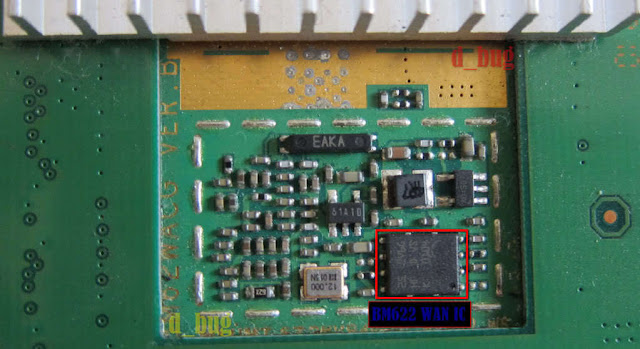
How to Repair Blank Wan BM622


Huawei BM622 model is the first 4G WiMAX CPE wireless broadband modem supplied by Huawei Technologies from Shenzhen's for Globe Telecom one of the major wireless broadband ISP in the Philippines.  


Fix BM622 (Tabo) Blank WAN

Recently there were so many complains from the 4G WiMAX wireless broadband subscribers that their CPE modem can't access to the internet. They have noticed upon opening the web GUI of the said 4G WiMAX CPE modem Huawe BM622 on the part of WAN interface its MAC address is missing/blank no wonder their connection interrupted or unsuccessful.

Until now there is still an issue of so called "BLANK WAN" of Huawei BM622 4G WiMAX wireless broadband CPE, to solved this problem and issue one should knows in basic electronics skill. BLANK WAN in other words WAN chips the ST Micro/SGS M25P32 Serial flash Memory IC is corrupted this is due to malicious programming or setting done by user in wrongly manipulations.

These are the things what you need to be able to solved your Huawei BM622 BLANK WAN.

    50pesos LPT SPI hardware programmer or USB SPI hardware programmer (DIY Download)
    TV/DVD SPI Flash programmer software (Download here)
    ST Micro/SGS M25P32 Serial flash Memory dump binary (ask Google/Forum/Neighbor/Friend)

The procedure to solve the BLANK WAN, first buy or do it yourself LPT SPI hardware programmer. Second is to download TV/DVD SPI flash programmer, third download BM622 WAN dump file here (Download dump file) or download via TFTP your neighbor/friend BM622 ST Micro/SGS M25P32 Serial flash Memory dump binaries to your local drive.

Fix BM622 (Tabo) Blank WAN

If you have all these stuff now you can removed your Huawei BM622 WAN chips ST Micro/SGS M25P32 Serial flash Memory IC from its board and start uploading via LPT SPI hardware programmer or USB SPI hardware programmer using the TV/DVD SPI Flash programmer software.

Lastly, of course you have to put back your ST Micro/SGS M25P32 Serial flash Memory IC to its place again. If you are tired of placing it to its original position you can just soldered using 1ft/12 inches tiny wires for simplicity.

Tags: Wimax, BM622 Blank Wan
Huawei BM622 model is the first 4G WiMAX CPE wireless broadband modem supplied by Huawei Technologies from Shenzhen's for Globe Telecom one of the major wireless broadband ISP in the Philippines.  


Fix BM622 (Tabo) Blank WAN


Recently there were so many complains from the 4G WiMAX wireless broadband subscribers that their CPE modem can't access to the internet. They have noticed upon opening the web GUI of the said 4G WiMAX CPE modem Huawe BM622 on the part of WAN interface its MAC address is missing/blank no wonder their connection interrupted or unsuccessful. 


Until now there is still an issue of so called "BLANK WAN" of Huawei BM622 4G WiMAX wireless broadband CPE, to solved this problem and issue one should knows in basic electronics skill. BLANK WAN in other words WAN chips the ST Micro/SGS M25P32 Serial flash Memory IC is corrupted this is due to malicious programming or setting done by user in wrongly manipulations.

These are the things what you need to be able to solved your Huawei BM622 BLANK WAN.
  1. 50pesos LPT SPI hardware programmer or USB SPI hardware programmer (DIY Download)
  2. TV/DVD SPI Flash programmer software (Download here)
  3. ST Micro/SGS M25P32 Serial flash Memory dump binary (ask Google/Forum/Neighbor/Friend)
The procedure to solve the BLANK WAN, first buy or do it yourself LPT SPI hardware programmer. Second is to download TV/DVD SPI flash programmer, third download BM622 WAN dump file here (Download dump file) or download via TFTP your neighbor/friend BM622 ST Micro/SGS M25P32 Serial flash Memory dump binaries to your local drive.


Fix BM622 (Tabo) Blank WAN


If you have all these stuff now you can removed your Huawei BM622 WAN chips ST Micro/SGS M25P32 Serial flash Memory IC from its board and start uploading via LPT SPI hardware programmer or USB SPI hardware programmer using the TV/DVD SPI Flash programmer software.


Lastly, of course you have to put back your ST Micro/SGS M25P32 Serial flash Memory IC to its place again. If you are tired of placing it to its original position you can just soldered using 1ft/12 inches tiny wires for simplicity.
- See more at: http://daily-wimax-mac.blogspot.nl/2014/03/fix-bm622-tabo-blank-wan.html#sthash.9yt4rd9u.dpuf

Free MyBro MAC Address for June 2014

https://blogger.googleusercontent.com/img/b/R29vZ2xl/AVvXsEgDOoL1C3Q0KPI3vPjUUk48g-Y2tiiw3_OeXU4H1NfjkJcDaGdSpEFC429Z8kSNMeiPZukqTyYpEWobzXLqJYQ-c92KuCJ1muH2Afzgp05aEStQhieAxc0dUoB94vMM0qSZFnhhymmKF7Ix/s1600/mybro+free+mac.jpg
Free MyBro MAC Address for June 2014
Free 5Mbps Mac Address for Mybro.. Enjoy

00:1F:FB:81:51:84
00:1F:FB:81:51:8E
00:1F:FB:81:51:93
00:1F:FB:81:51:98
00:1F:FB:81:51:9D
00:1F:FB:81:51:A2
00:1F:FB:81:51:A7
00:1F:FB:81:51:AC
00:1F:FB:81:51:B6
00:1F:FB:81:51:C0
00:1F:FB:81:51:CF
00:1F:FB:81:51:E3
00:1F:FB:81:51:E8
00:1F:FB:81:51:ED
00:1F:FB:81:51:F2
00:1F:FB:81:51:FC
00:1F:FB:81:52:01
00:1F:FB:81:52:0B
00:1F:FB:6F:81:17
00:1F:FB:6F:81:07
00:1F:FB:6F:80:EF
00:1F:FB:6F:80:E7
00:1F:FB:6F:80:DF
00:1F:FB:6F:80:D7
00:1F:FB:6F:80:CF
00:1F:FB:6F:80:B7
00:1F:FB:6F:80:AF
00:1F:FB:6F:80:97 - See more at: http://daily-wimax-mac.blogspot.nl/2014/05/working-dv235t-mybro-mac-2014-free.html#sthash.eAtOohzL.dpuf

00:1F:FB:81:51:84
00:1F:FB:81:51:8E
00:1F:FB:81:51:93
00:1F:FB:81:51:98
00:1F:FB:81:51:9D
00:1F:FB:81:51:A2
00:1F:FB:81:51:A7
00:1F:FB:81:51:AC
00:1F:FB:81:51:B6
00:1F:FB:81:51:C0
00:1F:FB:81:51:CF
00:1F:FB:81:51:E3
00:1F:FB:81:51:E8
00:1F:FB:81:51:ED
00:1F:FB:81:51:F2
00:1F:FB:81:51:FC
00:1F:FB:81:52:01
00:1F:FB:81:52:0B
00:1F:FB:6F:81:17
00:1F:FB:6F:81:07
00:1F:FB:6F:80:EF
00:1F:FB:6F:80:E7
00:1F:FB:6F:80:DF
00:1F:FB:6F:80:D7
00:1F:FB:6F:80:CF
00:1F:FB:6F:80:B7
00:1F:FB:6F:80:AF
00:1F:FB:6F:80:97
00:1F:FB:81:51:84
00:1F:FB:81:51:8E
00:1F:FB:81:51:93
00:1F:FB:81:51:98
00:1F:FB:81:51:9D
00:1F:FB:81:51:A2
00:1F:FB:81:51:A7
00:1F:FB:81:51:AC
00:1F:FB:81:51:B6
00:1F:FB:81:51:C0
00:1F:FB:81:51:CF
00:1F:FB:81:51:E3
00:1F:FB:81:51:E8
00:1F:FB:81:51:ED
00:1F:FB:81:51:F2
00:1F:FB:81:51:FC
00:1F:FB:81:52:01
00:1F:FB:81:52:0B
00:1F:FB:6F:81:17
00:1F:FB:6F:81:07
00:1F:FB:6F:80:EF
00:1F:FB:6F:80:E7
00:1F:FB:6F:80:DF
00:1F:FB:6F:80:D7
00:1F:FB:6F:80:CF
00:1F:FB:6F:80:B7
00:1F:FB:6F:80:AF
00:1F:FB:6F:80:97 - See more at: http://daily-wimax-mac.blogspot.nl/2014/05/working-dv235t-mybro-mac-2014-free.html#sthash.eAtOohzL.dpuf

Free VIP and 2-3Mbps Mac Address for 2014


VIP mac addresses 8-10 mbps


Globe Wimax VIP mac address 2 - 5 mbps

    00:21:07:00:F5:B2
    00:21:07:00:F6:16
    00:21:07:00:F6:7A
    00:21:07:00:F6:DE
    00:21:07:00:F7:42
    00:21:07:00:F7:A6
    00:21:07:00:F8:0A
    00:21:07:00:F8:6E
    00:21:07:00:F8:D2
    00:21:07:00:F9:36
    00:21:07:00:F9:9A
    00:21:07:00:F9:FE
    00:21:07:00:FA:62
    00:21:07:00:FA:C6
    00:21:07:00:FB:2A
    00:21:07:00:FB:8E
    00:21:07:00:FB:F2
    00:21:07:00:FC:56
    00:21:07:00:FC:BA
    00:21:07:00:FD:1E
    00:21:07:00:FD:82
    00:21:07:00:FD:E6
    00:21:07:00:FE:4A
    00:21:07:00:FE:AE
    00:21:07:00:FF:12
    00:21:07:00:FF:76
    00:21:07:00:FF:DA


Globe Wimax VIP mac address 2 - 5 mbps

2-3 mbps mac for all! 

64:16:F0:C5:59:80|6416F0-500807778004028980
20:2B:C1:E0:AB:9D|202BC1-5636
04:C0:6F:02:E7:40|04C06F-500810118103026005
5C:4C:A9:C0:E8:0A|5C4CA9-2525
10:C6:1F:AB:27:AA|10C61F-32104
20:2B:C1:AA:9F:55|202BC1-8854
10:C6:1F:AB:2A:92|10C61F-500807778007010763
64:16:F0:B0:FF:B6|6416F0-500807778003006954
64:16:F0:C5:E7:FA|6416F0-500807778912000377
78:1D:BA:1C:4C:EE|781DBA-50080777800ILA4891
64:16:F0:00:58:EC|6416F0-21500807778W9B012199
00:25:68:AC:A1:FB|002568-21500807778W99016837
5C:4C:A9:C0:BB:82|5C4CA9-500807778912005605
00:25:68:9C:03:E0|002568-21500807778W97027226
64:16:F0:00:5B:B6|6416F0-500807778912010565
64:16:F0:00:55:C6|6416F0-500807778007006890
40:4D:8E:AA:49:EB|404D8E-21500806958W96004383
20:2B:C1:E0:A6:4F|202BC1-500807778003001585
64:16:F0:00:91:92|6416F0-500807778912003730
20:2B:C1:AA:D0:A3|202BC1-500807778912004008
78:1D:BA:1C:3E:02|781DBA-500807778007012539
64:16:F0:7F:9B:B4|6416F0-500807778007014214
00:25:68:9C:46:9E|002568-21500807778W97035769
64:16:F0:7F:CB:EC|6416F0-500807778001031331
20:2B:C1:AA:A4:33|202BC1-2525
64:16:F0:C5:83:B4|6416F0-500807778004038468
64:16:F0:C5:01:40|6416F0-21500807778W9A011527
00:25:68:AC:7F:33|002568-21500807778W99012385
20:2B:C1:AA:AD:61|202BC1-500810118105022930
64:16:F0:00:D7:04|6416F0-500807778912011923
64:16:F0:7F:74:A2|6416F0-21500807778W99020948
64:16:F0:C5:30:AE|6416F0-500807778004023755
00:25:68:36:D4:CD|002568-21500806958W96012329
00:25:68:AB:D6:4B|002568-21500807778W99009679
78:1D:BA:1C:60:6A|781DBA-21500807778W9B011638
00:25:68:AC:FA:1B|002568-21500807778W99008017
20:2B:C1:AA:E8:5D|202BC1-2525

How Wimax Connection become Stable with Free Mac Address 2014

How Wimax Connection Become Stable?

We are referring to Globe Wimax connection here. Now for you to have a good internet connection. Frequency is the key for that. You have to find a good frequency and patience is a virtue here.

BM621 globe wimax

How we gonna change modem frequency?


Take Note:  That  the frequency varies differently. 


Let start to discuss the procedure. I will try to post procedure in the easiest way the reader can understand.Please read the instruction briefly for you to execute smoothly.

Procedures:

  • You may first check if the telnet is enabled on you laptop or desktop computer. To check in telnet is enabled. Here are basic steps to do that. 

    Click Start and go to Control Panel.

    Select programs, Then Programs and Features

    Select turn program feature On or Off

    Check on the telnet client, then click Ok.


    Now you have successfully enable the Telnet, let's proceed to the main part, which is setting the frequency and QoS of your WIMAX. 


    Open browser and navigate to this URL 192.168.1.1 for BM622, BM621,BM625. Some wimax may have 192.168.255.255.

    The default user name and password is "user". However, we will need to access the administrator account to change the frequency and QoS so type "Admin" for the user name and the admin password will be manually generated using the WIMAX tool or other password generating tool. You can also PM me your MAC address and I'll generate an administrator password for you.

    So we've successfully access the GUI of your WIMAX modem. Now, let's do some tweaks. Click on the the plus sign before the "Advanced" and select QoS, change it to 63 and click apply.

    Now, click on WIMAX and then Scan Set. You can try changing the channel from 2612000 KHz,  2622000 KHz, 2507500 KHz, 2602000 KHz, 2638000 KHz, 2505000 KHz, and 2510000
    KHz until you find a stronger and more stable frequency. That's it


    Frequency List by Area

    Tondo - 2505000KHz (*dito daw lagi nagcoconect)
    Tanauan City Batangas - 2638000KHz
    Marikina - 2505000KHz/2622000KHz
    San Pedro, Laguna - 2505000KHz
    Bacolor Pampanga - 2505000KHz
    Las pinas 2505000/2622000
    2612000 - cubao, qc. 
    2602000KHZ - Batangas City
    Monumento 26120000 
    los banos 2602000 
    Zamboanga City - 2622000 KHz 
    Tagaytay - 2602000/2612000 
    2602000nasugbu batangas
    quanta macs po gumagana
    Imus Cavite - 2622000 
    Imus cavite 2612000 to 2622000


    Hagonoy Bulacan - 2612000KHz
    Muzon San Jose Del Monte Bulacan - 2505000KHz
    Dasmarinas Cavite (bayan) - 2612000KHz
    Area 1 Dasmarinas Cavite - 2505000KHz
    Caloocan - 2505000KHz/2602000KHz
    Caloocan (2nd District) - 2602000KHz
    General Trias (town proper) - 2602000KHz
    LAS PIÑAS - 2612000KHz


    SM Marilao Bulacan - 2612000KHz
    Fausta Malolos Bulacan - 2622000KHz
    Lambakin Marilao Bulacan - 2638000KHz
    Turo Bocaue Bulacan - 2505000KHz
    Angat bulacan - 2602000KHz
    Dasmarinas Cavite - 2612000KHz
    Bocaue Bulacan - 2638000KHz
    Balagtas Bulacan - 2638000KHz
    Guiguinto Bulacan - 2638000KHz
    Tabe, Guiguinto Bulacan - 2602000KHz
    Plaridel Bulacan - 2622000KHz
    Baliwag Bulacan - 2638000KHz
    San Miguel Bulacan 2612000KHz
    Sta.Maria Bulacan - 2612000KHz
    Tanauan area -2622000KHz
    Davao - 2622000KHz
    Nueva Ecija - 2612000KHz
    A.Mibini - 2612000KHz
    C-3 - 2612000KHz
    Pasig - 2612000/2622000KHz
    Baguio - 2505000KHz
    Kawit,Cavite - 2638000KHz
    Tarlac Area ( near town proper ) - 2505000KHz
    Cebu - 2602000KHz
    GenSan - 2622000KHz
    Mandaluyong City - 2612000KHz & 2505000KHz
    Binmaley Pangasinan - 2602000KHz
    Cabuyao, Laguna - 2612000KHz (2602000KHz - Pag madaling araw daw)
    CDO area - 2505000KHz
    Cauayan Isabela - 2612000KHz
    Tabuc Suba Jaro Iloilo - 2612000KHz
    San Pedro Laguna - 2505000KHz
    Cotabato City - 2602000KHz
    San Rafael Bulacan - 2505000KHz


    Now, here are some of the stable 2-3 mbps WIMAX MAC Address I found on the net.

346BD348E170
346BD3492FF0
6416F07BF6CE
346BD34930A0
C8D15E2487A4
04C06FFB3508
C8D15E24450C
202BC1AB11A7
C8D15E245BD0
6416F0C5DF82
346BD348F96C
C8D15E248920
346BD348AEEC
346BD348ED2C
C8D15E250E8C
C8D15E2422CC
84A8E445AA25
C8D15E253148
C8D15E2470F0
04C06F60D498
6416F000D6AE
C8D15E2494E4
C8D15E249004
C8D15E2531C4
346BD348E210
346BD348ABD0
C8D15E2466E8

How to Edit the Configuration File of BM622i 2010 Version

How to Edit the Configuration File of BM622i 2010 Version

After reading this article,You must be able to know how to configure BM622i 2010. Below are the basic procedure.
  • Paste the mac address to Wimax Password Generator.
  •  Remember the password that was generated. " SAVE blahblahblah "
  • Open Mozilla browser and go to URL 192.168.254.1
 
  • A pop up menu will appear and you must enter the login info.
  • Log in Username is admin
  • Password : Copy the generated password from the Password Generator.
  • Once you successfully logged In, Go to Maintenance  -  Configuration and select Download Config.
  •  Right click download config then open it with Notepad++. If unlucky you do not have yet a notepad++ apps. No worries you may download : NOTEPAD++
  •  Once you had open it with the Notepad++ apps. Edit the following code and SAVE it. Refer to the photo below provided.


  •   Next is to upload the edited config file. To do that , Go Maintenance  -  Configuration then browse the file from where it was save in your hard drive.
  • Click Upload.
  • Modem will auto reboot. Once it rebooted.
  • Disable your Telnet. Done


Copyright @ 2013 MobileTricks.

Designed by PH-MobileTricks